Twitter Feed Facebook Google Plus Youtube

Adsense responsive

Recent Post below header

Showing posts with label Mozilla Firefox. Show all posts

Monday, 18 August 2014

BEST MOZILLA FIREFOX ADD-ON TO DOWNLOAD YOUTUBE VIDEOS [VIDEO]

BEST MOZILLA FIREFOX ADD-ON TO DOWNLOAD YOUTUBE VIDEOS [VIDEO]Did you ever thought downloading YouTube video can be so easy that there is a Download button available on YouTube video watch page. Never!!!
Did you think I am dreaming, no.. absolutely not. We know that YouTube will not add download button but this doesn't mean that it is not possible. I am not joking, this can be possible because of a Mozilla Firefox add-on. Just install Mozilla Firefox add-on available on http://goo.gl/TFiJ3v .

For instructions you can watch the video below:


For any query or suggestion please comment below...

Tuesday, 1 April 2014

CUSTOMIZE MOZILLA FIREFOX NEW TAB USING ADD-ON

If you want to customize new tab / Home Page in Mozilla Firefox browser then here is a add-on that can help you. To see how to use this add-on watch this video.


Mozilla Firefox Addon: http://goo.gl/SdoDFU

 If you have any query feel free to comment below...

Sunday, 2 February 2014

TOP SIX MOZILLA FIREFOX ADDON THAT YOU MUST INSTALL

Mozilla Firefox AddonMozilla Firefox is a open source web browser. Best feature of this browser is that it provides the facility of adding add-ons to it. It enhances the experience of web surfing and provide many awesome tools to users.
Today we had handpicked six awesome add-ons for you. So give them a try.
1. Turn Off the Lights 

The entire page will be fading to dark, so you can watch the video as if you were in the cinema. In other words you can say it is a night mode in Mozilla Firefox browser.
2. View Source Chart

Inspect the DOM at lightning speed. It shows the source code of a webpage in nice pictorial manner which leads to easy understanding of HTML tag boundaries and webpage source. So it is a best add-on for the web developers.
Download it from
https://addons.mozilla.org/en-US/firefox/addon/view-source-chart

 
3. FireFTP

FireFTP is a free, secure, cross-platform FTP/SFTP client for Mozilla Firefox which provides easy and intuitive access to FTP/SFTP servers. Frankly speaking it is a best & compact FTP client that I had ever used.
 
4. RightToClick

Stops javascript annoyances such as forbidden right click, forbidden text selection or cascading dialog boxes. So no one can stop you from selecting text , right clicking on a website.

 
5. Greasemonkey

Customize the way a web page displays or behaves, by using small bits of JavaScript. Several amazing JavaScript codes are available at http://userscripts.org . So give them a try.
Download it from https://addons.mozilla.org/en-US/firefox/addon/greasemonkey


6. Download YouTube Videos as MP4

A best method to download YouTube videos. It adds a download button below the video player on YouTube watch page. For more detail about this add-on  click here
If you have any query feel free to comment below...
 

Tuesday, 25 June 2013

HOW TO DOWNLOAD YOUTUBE VIDEOS USING MOZILLA FIREFOX ADD-ON

YouTube is a online video sharing website. It has millions of videos in its database and number of these videos is increasing per minute. Many times we want to download YouTube videos but download button is missing on YouTube. But this can be done using a Mozilla Firefox add-on.

1. First of all click here to install YouTube download add on.
2. On page opened in new tab click on Add to Firefox button.
3. Download & install this 13-14 Kb add on and restart Mozilla Firefox.
4. Goto YouTube and search your desired video and click on it.
5. On YouTube watch page you will see a drop down download button below video player.
6. Click on it and choose quality of video you want to download.

That's all, see video below for more detail.

Thursday, 20 June 2013

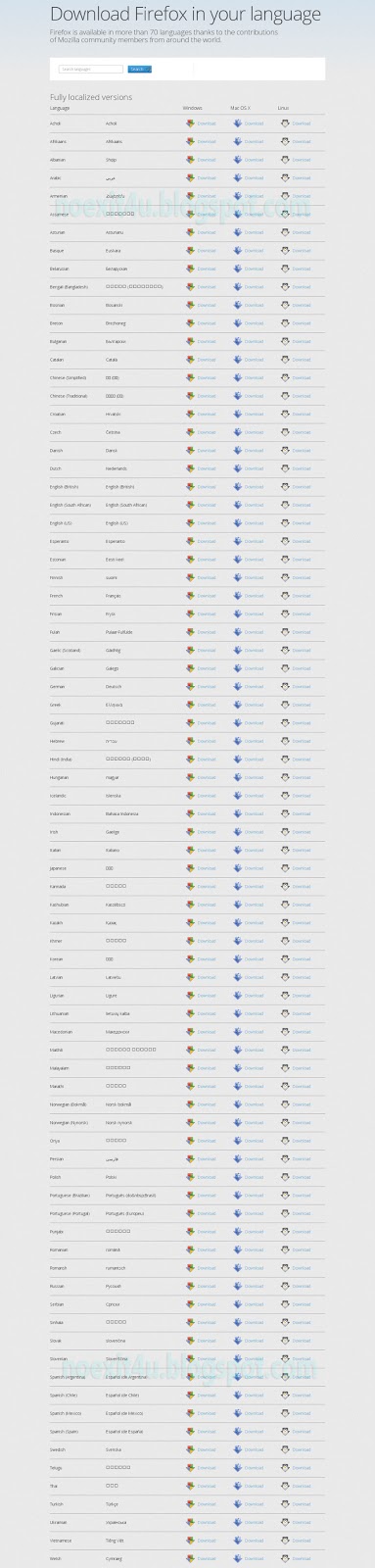
DOWNLOAD MOZILLA FIREFOX IN 70+ LANGUAGES

Mozilla Firefox is a open source and very powerful internet browser. It supports almost all types of webpages and other internet content. It comes with latest and most popular features. It is available for MAC , Windows and Linux operating systems.

You can also download Mozilla Firefox in 70+ languages. For this first of all go to www.mozilla.com and click on Systems & Languages.   Now find the desired language and in front of it choose your operating system. Your downloading will start. After downloading setup,  just install it.  That's all .  

DOWNLOAD MOZILLA FIREFOX IN 70+ LANGUAGES


Thursday, 7 February 2013

MOZILLA FIREFOX IN 3D / THREE DIMENSIONAL VIEW

Mozilla Firefox is a open source browser. It is fast, secure and easy to use.It provides many developer tools and other nice options.It is available for different operating systems like Windows, Linux, Mac, Android etc.

You can download it from its official site "http://www.mozilla.org/en-US/" and can learn more about it from there.

Follow the steps given below to view Mozilla Firefox in 3D:

1.Open the webpage you want to view in 3D.


2.Then right click mouse and select "Inspect Element (Q)" or press Ctrl+Shift+I.


3.You will see a bar at the bottom of Mozilla Firefox window, go to it and select "3D View" option.


NOTE: Use mouse wheel to zoom in and out and press left mouse button & move mouse to rotate page and press right mouse button & move mouse to up & down page. To exit 3D view click on cross present at right bottom corner of Mozilla Firefox window.


For any query or suggestion please comment below...